

Cheap ESP32 S3 LED Matrix module from AliExpress
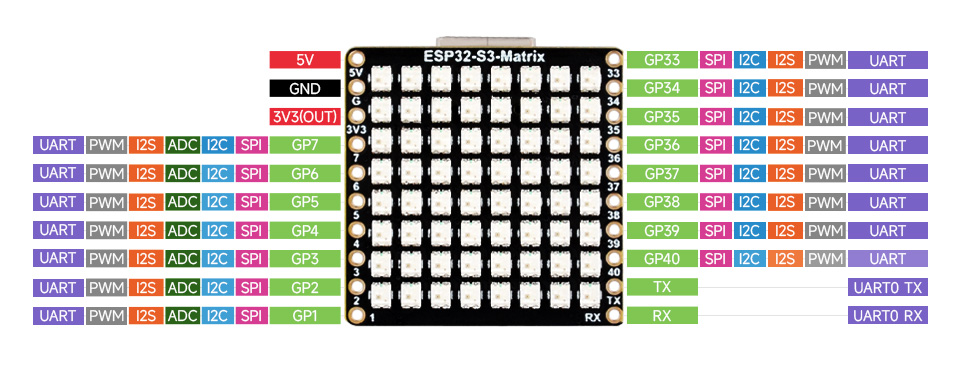

The Adafruit NeoPixel Matrix library works. Pin 14 is used.
The Arduino IDE needs the Tools option 'USB CDC On Boot' enabled so the the USB serial works.
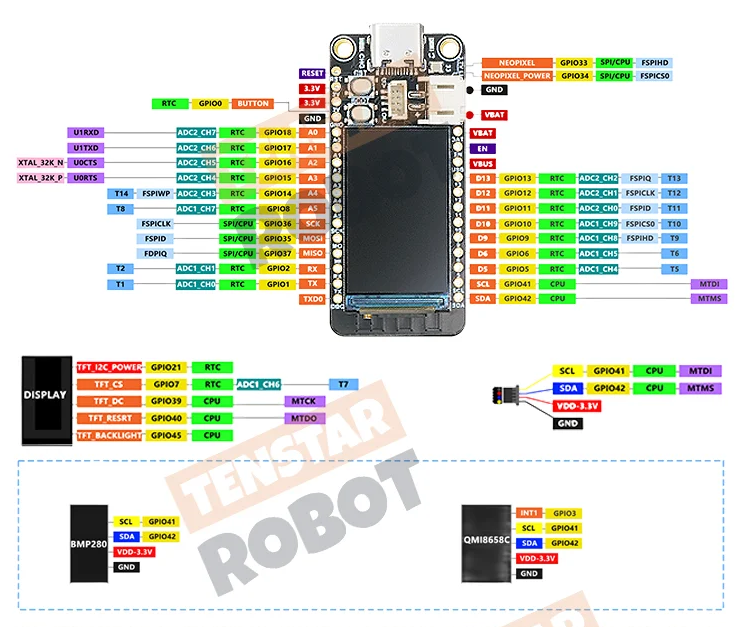
I2C uses pins 41 (SCL) and 42 (SDA).
Wire.begin(42,41);
BMP280 at I2C address 0x6B.
QMI8658 at I2C address 0x77.
RGB LED in pin 33.
Red LED on pin 13.
TFT LCD using ST7789. For TFT_eSPI the config will need:
#define ST7789_DRIVER
#define TFT_WIDTH 135
#define TFT_HEIGHT 240
#define TFT_BL 45
#define TFT_MISO 37
#define TFT_MOSI 35
#define TFT_SCLK 36
#define TFT_CS 7
#define TFT_DC 39
#define TFT_RST 40
#define SMOOTH_FONT
To use the Adafruit GFX library, setup looks like this:
#include <Adafruit_GFX.h>    // Core graphics library
#include <Adafruit_ST7789.h> // Hardware-specific library for ST7789
#include <SPI.h>

// TenStar ESP32S3
#define TFT_MOSI    35
#define TFT_SCLK    36
#define TFT_CS      7
#define TFT_DC      39
#define TFT_RST     40
#define TFT_BL      45

Adafruit_ST7789 tft = Adafruit_ST7789(TFT_CS, TFT_DC, TFT_MOSI, TFT_SCLK, TFT_RST);

void setup(void) {
  pinMode(TFT_BL, OUTPUT);
  digitalWrite(TFT_BL,HIGH);
  tft.init(135, 240);           // Init ST7789 240x135
  tft.fillScreen(ST77XX_BLACK);
  tft.setTextSize(1);
  tft.setCursor(0, 0);
  tft.setTextColor(ST77XX_GREEN);
  tft.setTextWrap(true);
  tft.print("Display initialised");
}
To program the board from Arduino, you must put the board into boot mode, so hold down the boot button and press and release the rst button.
To use the serial port, USB CDC on Boot must be enabled.
Once the program is loaded, press rst to start running the program.